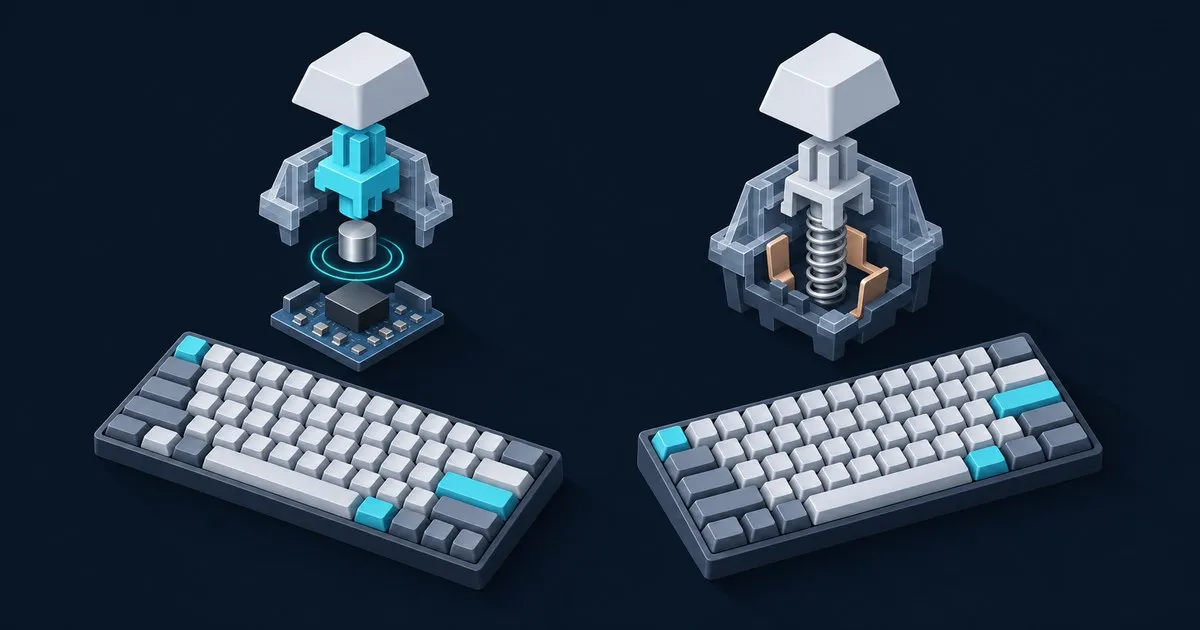
Which is better, a Hall effect or a mechanical keyboard? Hall effect wins for competitive FPS and rhythm games, because adjustable actuation and rapid trigger let a key reset the instant you lift. Mechanical wins for typing feel, sound tuning, tactile and clicky switches, and open QMK/VIA firmware. If you mostly type, stay mechanical.
The naming muddies this. A Hall effect board is still mechanical in the physical sense: a stem rides a spring inside a housing and takes MX-style keycaps. What changes is how the board decides a key is pressed, and that one difference drives everything below. Keyboard Comparison’s comparison of Hall effect and mechanical switches covers the switch hardware on its own.
Which one should you buy? A quick decision tree
Buy Hall effect if you play tactical or arena shooters at a level where counter-strafing matters and you will retune actuation per game. Buy mechanical if you type more than you frag, want a tactile bump or a click, or enjoy tuning switches and firmware. Unsure? Start mechanical.
- What do you do most? Typing, coding and office work point to mechanical. Ranked shooters and rhythm games built on rapid re-presses point to Hall effect.
- What feel do you want? A bump or a click means mechanical, where the switch catalog is enormous. Smooth linears work on either.
- How much do you want to tinker? Lubing, filming, spring swaps and QMK keymaps are mechanical-board territory. Deep per-key gaming tuning in one app is the Hall effect pitch.
- Size and budget. Layout matters more than sensing for desk fit, so settle it with our keyboard form factors guide, then set a spend with the buying guide by budget.
How do Hall effect and mechanical switches actually work?
A mechanical switch registers a press when two metal contacts touch at one fixed depth. A Hall effect switch carries a magnet in its stem, and a sensor on the PCB reads that magnet’s distance continuously. The contact switch knows two states, open or closed. The Hall effect board knows where the stem sits along the whole stroke.
Cherry’s MX Red spec sheet is the reference point for contact switches: 45 cN operating force, 2 mm pre-travel, 4 mm total travel, and MX Gold Crosspoint contacts rated beyond 100 million keystrokes. That 2 mm is built into the switch. “Speed” linears with shorter pre-travel are still fixed, just shallower. After a press, the key must rise back past a fixed reset point before it can fire again.
Texas Instruments’ application note on position sensing in keyboard applications lays out the magnetic approach: a linear Hall-effect sensor under each key tracks magnetic flux, so firmware can convert it to stem position and apply any threshold it likes. Nothing touches, so there are no contacts to wear or bounce. That continuous read enables three features:
- Adjustable actuation. Wooting’s 60HE v2 page advertises per-key actuation with 0.1 mm precision across the full 4 mm of travel.
- Rapid trigger. The key releases as soon as it starts rising and fires again as soon as it drops, with no fixed reset point.
- Analog and multi-action input. The same page lists an analog gamepad mode for WASD and Dynamic Keystroke, which maps one action to a half press and another to a full press.
Does rapid trigger actually make you faster?
Rapid trigger makes specific inputs faster, not you in general. It helps wherever you release and re-press the same key quickly: counter-strafing in Counter-Strike and Valorant, jiggle peeks, and dense streams in rhythm games. It does nothing for aim, game sense or typing speed, and a 2 mm contact switch is rarely why you lost a duel.
The mechanism is real. On a contact switch, releasing D to stop a strafe means lifting the key back past its reset point. With rapid trigger at a fine sensitivity, the release registers the moment the key starts coming up, so your character stops a little sooner. Wooting’s copy promises “speed no rival can match”; strip the marketing and the physics is a shorter distance to reset.
The controversy sits one feature over. In August 2024 Valve drew a line on hardware automation in Counter-Strike 2, targeting Snap Tap-style modes that resolve opposing movement keys for you, plus null binds. Players suspected of automating multiple actions from one input can be kicked on Valve official servers. Wooting’s SOCD mode is called Snappy Tappy, so switch it off before queuing CS2 and check league rulebooks separately. Our gaming keyboard criteria cover what else matters in competitive play.
Which is better for typing and sound?
Mechanical is better for typing for most people, and the reason is switch choice. Contact switches come in linear, tactile, clicky and silent variants from dozens of makers, and all of them drop into any MX-style hotswap socket. Magnetic catalogs are growing but still lean heavily linear, and typing-first tactile options are thin.
Some exist. Gateron sells a Magnetic Jade Emerald heavy tactile for Hall effect boards, rated for 150 million keystrokes. But if you want Boba U4T tactiles one month and HMX Violet linears the next, that whole shelf is contact switches.
Two typing traps are specific to magnetic boards:
- Hair-trigger actuation. A 0.1 to 0.5 mm actuation point that feels great on WASD fires keys your resting fingers barely brush. Set typing profiles nearer a conventional depth; Cherry puts the MX Red at 2 mm.
- Rapid trigger on letter keys. A fine release threshold plus lazy finger lift can double or drop characters. Keep it on the movement cluster.
Sound comes from the case, plate, keycaps and stem, not from how the PCB senses a press. The Wooting 60HE+ uses an ABS case per its spec page, so it sounds like an ABS 60 percent board with linears. A magnet does not make a switch thock. For quiet builds, see our quiet keyboards for the office; for long sessions, the picks for writers.
Hall effect vs mechanical: side-by-side comparison
| Factor | Hall effect (magnetic) | Mechanical (contact) |
|---|---|---|
| How a press registers | Sensor reads magnet position along the stroke | Metal contacts close at one fixed depth |
| Actuation point | Adjustable per key (Wooting: 0.1 mm precision) | Fixed by the switch (MX Red: 2 mm) |
| Rapid trigger | Yes | No; key must pass a fixed reset point |
| Analog input | On some boards (gamepad-style WASD) | No |
| Switch feel options | Mostly linear, a few tactile | Linear, tactile, clicky, silent |
| Switch compatibility | Magnetic switches for Hall effect PCBs only | Any MX-style switch in MX hotswap sockets |
| Configuration | Mostly vendor software (e.g. Wootility) | QMK, VIA and Vial common on hobby boards |
| Contact wear | None; sensing is contactless | Slow (MX Red rated past 100M keystrokes) |
| Modding ecosystem | Growing, smaller | Very large |
What are the watch-outs before switching to Hall effect?
The big three are switch lock-in, vendor software dependence and tuning time, on top of the CS2 SOCD rule above. None is a dealbreaker, but each costs flexibility that hobby mechanical boards give you for free.
- Switch lock-in. Milktooth’s listing for the Gateron Magnetic Jade Pro states it “is not compatible with traditional MX-style keyboards,” and your MX switch collection will not register in a Hall effect board either. Some boards expect a specific magnet orientation, so check the maker’s compatibility list first. Our hot-swap keyboard guide covers the much larger contact-switch side.
- Vendor software. Actuation, rapid trigger and profiles usually live in the maker’s app, not QMK or VIA. Wooting’s Wootility runs as a desktop app or in the browser, but your board’s features depend on the vendor maintaining it. Treat configurators and firmware updaters like any software with low-level device access and download them only from the maker’s own site.
- Tuning time. Default profiles vary by maker. Expect to set per-key actuation and rapid trigger sensitivity yourself before a board feels right for mixed gaming and typing.
Is a Hall effect keyboard worth it over a good mechanical one?
A Hall effect board is worth it if you play competitive shooters or rhythm games seriously and will actually configure it. It is not worth it as a durability or typing upgrade. Money spent on case, plate, stabilizers and keycaps changes how a board types and sounds far more than the sensing method does.
Durability gets oversold. Contactless sensing removes contact wear, and Wooting backs the 60HE+ with a four-year warranty excluding LEDs. But Cherry already rates the MX Red past 100 million keystrokes, and springs, stabilizer wires, keycaps and USB ports age on both types. When a contact board does act up, chatter and dead keys are usually fixable; see our common mechanical keyboard problems and fixes.
A practical middle path is two boards: a magnetic 60 or 65 percent for games, and a mechanical board tuned for feel and sound for everything else. That split mirrors the endgame question in the buying guide by budget: spend on the specific thing you want rather than on a price tier.
FAQ
Is a Hall effect keyboard still a mechanical keyboard?
Yes, physically a Hall effect keyboard is a mechanical keyboard: each key has a stem, spring and housing, and most take MX-style keycaps. The difference is sensing. A magnet in the stem and a sensor on the PCB measure key position instead of metal contacts closing, which is why they are often called magnetic or analog keyboards.
Can you put regular mechanical switches in a Hall effect keyboard?
No. Hall effect boards need magnetic switches because the PCB reads a magnet rather than an electrical contact, and ordinary MX switches carry no magnet. The reverse fails too: magnetic switches will not register on an MX PCB. Buy switches from the board maker’s compatibility list and check magnet orientation wherever the maker specifies it.
Is rapid trigger banned in CS2?
No, rapid trigger was not the target of Valve’s August 2024 rule. Valve went after automation that turns one input into multiple actions, such as Snap Tap-style SOCD modes and null binds, which can get you kicked on official servers. Disable SOCD features like Wooting’s Snappy Tappy before queuing, and check tournament rules separately.
Do Hall effect keyboards last longer than mechanical ones?
They can, because contactless sensing removes the metal contact wear that eventually causes chatter on contact switches. The real-world gap is smaller than marketing implies: Cherry rates the MX Red past 100 million keystrokes, and springs, stabilizers, keycaps and USB ports wear on both types. Buy on feel and features, not on lifespan claims.
Related across the network
- Linear vs Tactile vs Clicky: Which Mechanical Switch to Buy? — kbdcompare.com
- How to Choose a Mechanical Keyboard Switch: A Decision Guide — mechkbguide.com
- Membrane vs Mechanical Keyboards Compared — kbdcompare.com
- Understanding the Mechanical Keyboard Hobby and Its Jargon — mechkbguide.com


